QR Code Versioning: Managing Changes Without Losing History
QR codes are often treated as static assets. Generate a code, download it, print it, and use it wherever required.
But what happens when the destination URL changes? What if a business updates its landing page, replaces an old document, or modifies the information connected to an existing QR code?
Creating a new QR code every time a destination changes may seem like a simple solution. However, it can create unnecessary work, especially when thousands of QR codes are already printed, distributed, or integrated into physical products.
This is where QR code versioning becomes important.
Instead of treating every QR code update as a completely new record, versioning allows developers to maintain a history of changes while keeping the original QR code functional.
Let's explore how this can be implemented.
1. Understanding QR Code Versioning
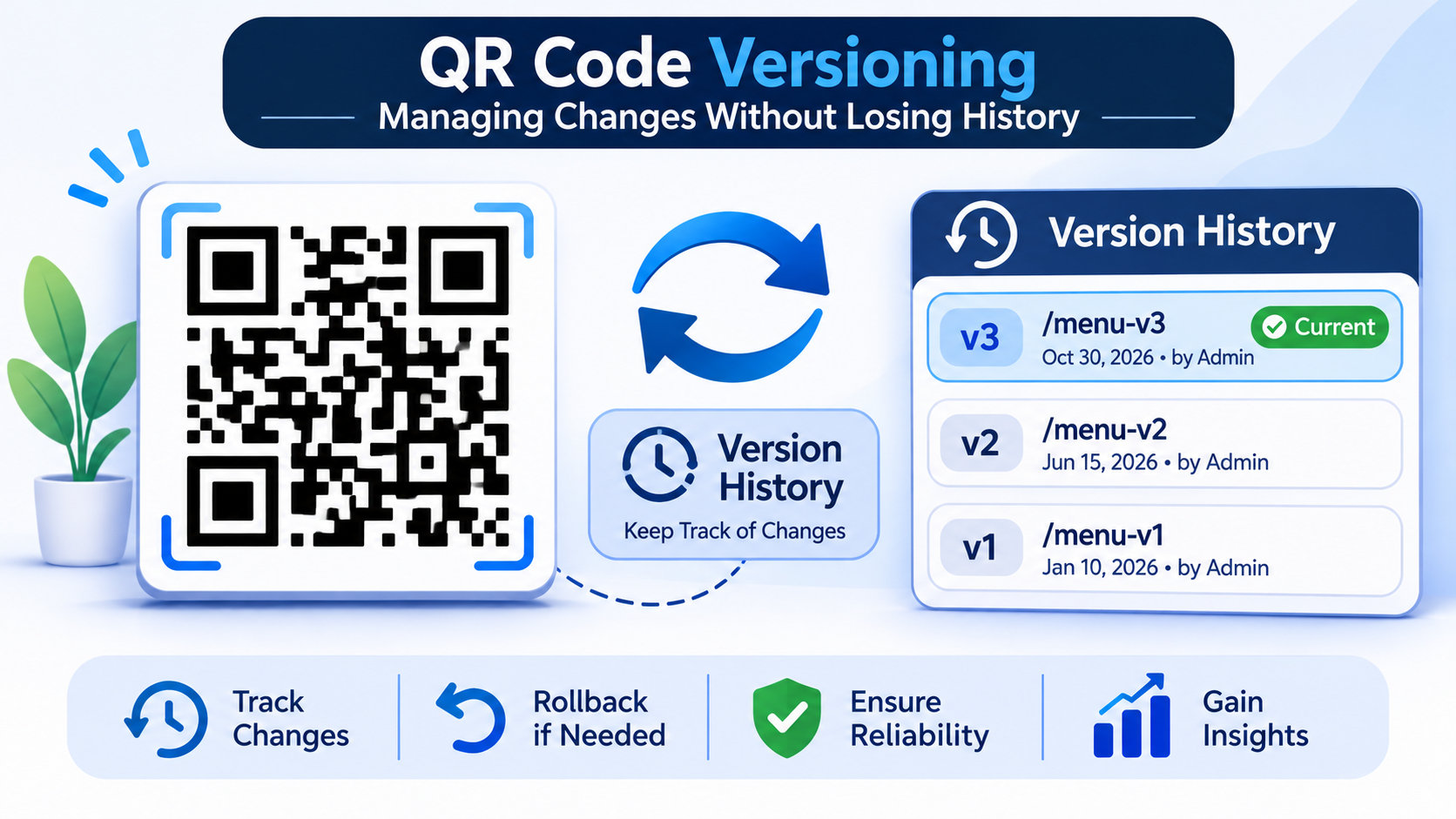
QR code versioning is the process of maintaining multiple versions of the information or destination associated with a QR code.
Consider a restaurant that uses a QR code on its tables to display its digital menu.
Initially, the QR code points to:
https://example.com/menu-v1
After a few months, the restaurant updates its menu. Instead of printing new QR codes, the system can update the destination to:
https://example.com/menu-v2
The physical QR code remains unchanged, but its destination is updated.
The important part is that the system should also retain the previous destination and its associated metadata.
This creates a manageable history of changes without affecting the existing QR code.
2. Why Maintaining QR Code History Matters
Without version control, updating a QR code destination can overwrite valuable information.
A properly designed versioning system provides several advantages:
- Change Tracking: Developers can identify when a destination was modified and what was changed.
- Rollback Support: Previous versions can be restored if an update introduces an issue.
- Audit History: Every modification can be associated with a timestamp and the user responsible for it.
- Operational Reliability: Existing printed QR codes can continue working even when their destinations change.
- Better Analytics: Historical versions can help understand how destination changes affect scanning behaviour.
For applications managing large QR code collections, these capabilities become particularly useful.
3. Designing the Database Structure
A practical approach is to separate the main QR code record from its version history.
Instead of repeatedly modifying the same database record, maintain a dedicated version table.
For example:
QR Codes Table
| Field | Description |
|---|---|
| id | Unique QR code identifier |
| short_code | Permanent identifier used in the QR URL |
| current_version_id | Reference to the active version |
| status | Active, inactive or archived |
| created_at | Creation timestamp |
QR Code Versions Table
| Field | Description |
|---|---|
| id | Unique version identifier |
| qr_code_id | Associated QR code |
| version_number | Version sequence |
| destination_url | Destination for this version |
| created_by | User who made the change |
| created_at | Version creation timestamp |
| change_reason | Reason for the update |
For example, a QR code may have three versions:
| Version | Destination | Status |
|---|---|---|
| V1 | /menu-v1 | Historical |
| V2 | /menu-v2 | Historical |
| V3 | /menu-v3 | Current |
The current version reference determines which destination should be used when someone scans the QR code.
This structure also makes it easier to retrieve previous versions without disturbing the active configuration.
4. Implementing Version Updates
When a user updates a QR code destination, the system should not overwrite the existing version.
Instead, it should follow a controlled process:
- Receive the updated destination URL.
- Validate the URL before accepting the change.
- Create a new version record.
- Assign the next version number.
- Update the QR code's current version reference.
- Record the user and timestamp associated with the change.
A simplified example using JavaScript:
async function updateQRVersion(qrCodeId, newUrl, userId) {
  const qrCode = await QRCode.findById(qrCodeId);

  if (!qrCode) {
    throw new Error("QR code not found");
  }

  const latestVersion = await QRVersion.findOne({
    qrCodeId
  }).sort({ versionNumber: -1 });

  const nextVersion = latestVersion
    ? latestVersion.versionNumber + 1
    : 1;

  const version = await QRVersion.create({
    qrCodeId,
    versionNumber: nextVersion,
    destinationUrl: newUrl,
    createdBy: userId,
    createdAt: new Date()
  });

  await QRCode.updateOne(
    { _id: qrCodeId },
    { currentVersionId: version._id }
  );

  return version;
}
This is an illustrative implementation. In production, version creation and updating the current version reference should happen within a database transaction to prevent inconsistent states if an operation fails.
URL validation, permission checks, and concurrency handling should also be implemented before accepting updates.
5. How Scanning Works After an Update
Versioning becomes especially useful when combined with dynamic QR codes.
A dynamic QR code typically contains a permanent redirect URL rather than the final destination.
For example:
https://example.com/q/ABC123
When someone scans the code, the backend:
- Receives the QR identifier.
- Retrieves the corresponding QR code record.
- Identifies its current version.
- Fetches the destination URL.
- Redirects the user to that destination.
The physical QR code does not need to change.
Only the active destination reference is updated.
This separation between the QR identifier and its destination is what makes version management practical.
6. Handling Rollbacks and Failed Updates
Not every update produces the expected result.
A newly updated landing page might contain broken links, display incorrectly on mobile devices, or lead users to the wrong information.
Without version history, recovering the previous configuration can become difficult.
A rollback mechanism allows administrators to restore an earlier version.
For example:
- Current version: V3
- Previous version: V2
- Required action: Restore V2
Rather than deleting V3, the system can create a new version using V2's destination.
The version history would then look like:
| Version | Destination | Action |
|---|---|---|
| V1 | /menu-v1 | Original |
| V2 | /menu-v2 | Previous update |
| V3 | /menu-v3 | Incorrect update |
| V4 | /menu-v2 | Restored from V2 |
This approach preserves the complete history instead of modifying or deleting existing records.
7. Best Practices for Building a Versioning System
While implementing QR code versioning, developers should consider the following:
- Keep Version Records Immutable: Avoid modifying historical records after creation.
- Use Database Transactions: Ensure version creation and active-version updates remain consistent.
- Validate Destinations: Prevent invalid URLs and potentially unsafe redirects.
- Maintain Audit Logs: Record who performed each update and when.
- Implement Access Controls: Only authorised users should be able to modify or restore versions.
- Monitor Redirect Performance: Version lookups should not introduce unnecessary scanning delays.
- Define Retention Policies: Establish how long historical versions and associated metadata should be retained.
These practices help maintain data integrity as the number of managed QR codes increases.
Conclusion
QR code management should not end with generating and downloading a code. As digital destinations evolve, maintaining control over updates becomes equally important.
Versioning provides a structured way to manage these changes without losing historical information or replacing existing printed QR codes.
For platforms such as Digital QR, this approach can support more reliable QR code management by separating permanent QR identifiers from changing destination configurations.
Ultimately, a well-designed versioning system makes QR codes easier to maintain, audit, and scale as business requirements change.
Comments
Join the discussionNo comments yet. Be the first to comment.